Hadar is a Ruby library for editing, presenting, and exporting Markdown slide decks. Your Markdown file remains the editable source. Hadar uses Beid for source-preserving edits and Zaniah for its interface and rendering.
On this page
Install Hadar
Use CRuby 3.2 or newer. Install the gem:
gem install hadar
For an existing Ruby project, add gem "hadar" to its Gemfile and run
bundle install. Prefix the Ruby commands below with bundle exec when using
Bundler.
Hadar does not install a hadar command. Launch it from a Ruby script.
Windowed use requires a display backend supported by Zaniah; see
Zaniah’s installation instructions
for your platform. PNG and APNG export use its headless renderer.
Write a deck
Save this UTF-8 text as slides.md:
---
theme: dark
---
# Quarterly report

## 2026 Q3

---

<!-- layout: two-column -->
# Revenue

::: left
Revenue rose 18% year over year.
:::

::: right
New customers: 42
:::

<!-- notes:
Explain the quarter's results before moving to the next slide.
-->
The first pair of --- lines encloses YAML front matter. Later thematic breaks
separate slides. Hadar selects a layout from the content, or uses an explicit
layout comment. Speaker notes stay out of the slides.
Open the presentation window
Save this as present.rb in the same directory:
require "hadar"

deck = Hadar::Deck.open(File.join(__dir__, "slides.md"))
app = Hadar::Application.new(deck)
window = Zaniah::Platform.open_window(title: "Hadar")
app.attach(main_window: window)
app.run
Run the script:
ruby present.rb
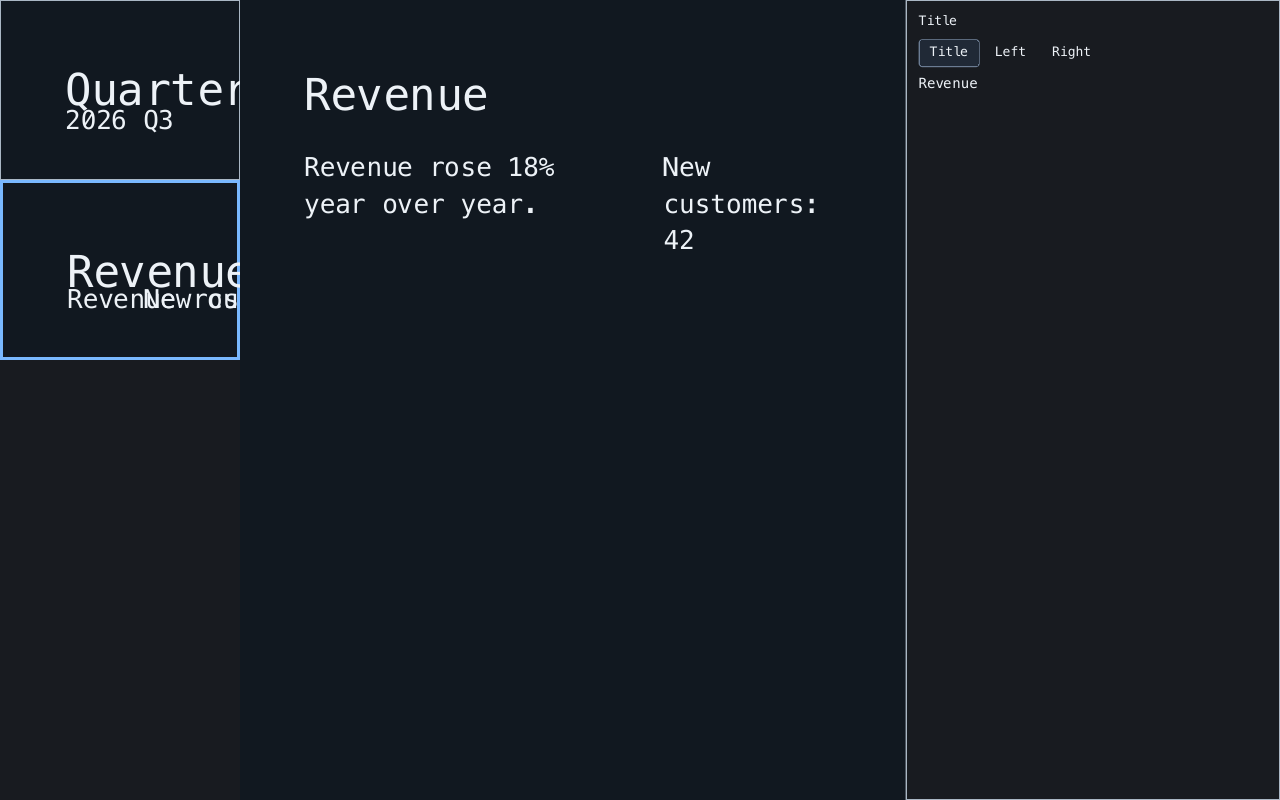
Select a thumbnail, then choose a slot in the editor pane. Press P or F5 to present, and Escape to leave presentation mode. Ctrl/Cmd-S saves the opened deck. See editing and presenting for all keyboard controls and the presenter view.
Use the Ruby API
Open an existing file with Deck.open, or parse a string with Deck.parse:
require "hadar"

deck = Hadar::Deck.parse("# Hello\n\n---\n\n# Next slide\n")
deck.length                    # => 2
deck.slide(0).layout            # => :title
deck.slide(0).slot(:title).text # => "Hello"
deck.slide(0).slot(:title).replace_text("Hello, Hadar")
deck.save("new-slides.md")
Slide and block indices are zero-based. After a successful edit, fetch the
slide or slot again: old slots are snapshots of the previous document.
Renderer#build(slide) returns a Zaniah element for embedding in your app;
Renderer#describe(slide) returns its preview description tree.
Export without a window
Save this as export.rb beside slides.md, then run ruby export.rb:
require "hadar"

deck = Hadar::Deck.open(File.join(__dir__, "slides.md"))
Hadar::Export::PNGSequence.write(deck, File.join(__dir__, "slides-png"))
This writes one numbered PNG per slide. The exporter refuses to replace existing frames. For searchable PDFs, animated PNGs, fonts, and output limits, see export.